
Improve PVA With Integrated Posture Assessments
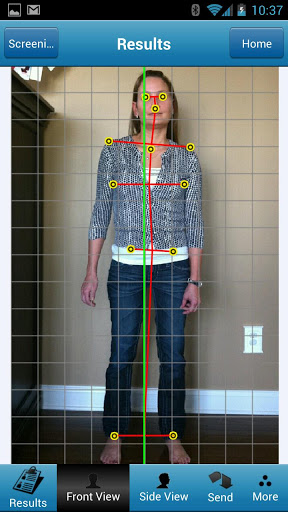
If you are looking for a way to improve the Patient Visit Average (PVA) and increase profitability as part of your “new patient” marketing efforts, you should consider using the posture assessment tools that are already integrated into your Genesis chiropractic EHR system. You will be able to impress prospective patients at health fairs and other marketing events with a visually effective, instant diagnosis via the PostureScreen App on your iPad, iPhone, or Android. Even more importantly, you will be able to collect and save their contact info in your Genesis patient data base at the same time. Since PVA is computed by dividing the number of total office visits by number of new patients in a chosen time frame, you can improve this value by increasing the conversion percentage of intro visits to care plans. The old adage that the eye buys holds true for the use of posture assessments because this visual tool lets a potential patient see any spinal misalignments for him- or herself and, therefore, ‘buy’ the diagnosis and need for chiropractic treatment. This type of patient education can increase the number of new patients resulting from marketing events while also improving first-visit conversions. The end result will be a higher ROI on your marketing efforts. The EHR integration ties everything neatly together by providing the opportunity to create a new patient file in your Genesis system within minutes or quickly update an old one while still with the patient. Any personalized results of the posture assessment can then be emailed to the patient for an opportunity to schedule a follow-up appointment or reinforce the patient’s compliance with a prescribed exercise program.
Disaster Recovery and Business Continuity Management | Genesis Chiropractic Powered by Vericle

https://youtu.be/WfD8PSijCAc So which situation would be worse for you? Your server going down and you having to figure that out and call some expert or have a patient that’s your tech guy come in and try to fix that or having a professional team of experts work on the server. Now I know I have a client right now that is a huge volume client, that had another system in his office, that was client server based. That means that their server was in their office. Fried their server. It took over a week to get an expert into the office that could figure out what to do with that server, and when they did it was already to late. They could barely recover any of that data. At that point their disaster recovery was too late. Now let’s talk about the other scenario, our data centers and the data in the server in our data servers. First of all there’s not just one server, there are multiple servers redundantly backed up to each other every few minutes, and if one of those servers goes down the other ones pick up the slack. Now God forbid all of those servers go down, we have experts that are in the data, that are experts at getting these things up and running Today you can go to any cell phone company store and pick up what’s called a Mifi Card, it’s about the size of a cell phone. It looks something this about the size of a cell phone, and that little server will be hooked up to your cell phone service but act as a wireless router. You can usually hook up about 5 computers to each little router. Now that’s just the emergency backup, if the computers go down, you have a laptop on hand that runs on battery for an hour or so. If the power goes out, you have your laptop and that little wireless router, you can be up and running with no internet and no power.
Genesis Chiropractic Software and Billing – EHR SOAP Note – Basic Training

Genesis Chiropractic Software and Billing (A product of Billing Precision, LLC) EHR SOAP note feature allows the user to quickly asses the patients condition from the previous visit and make fast changes to multiple parameters per complaint. 24 hour access to web based system. Do your notes from anywhere. Note templates are pre-configured based on real claim appeal data. Easy customization Fast creation of new note Daily visit note updated in seconds Dictation software ready – Dragon and Siri iPad Ready Touch Screen Ready Wow your patients with high tech look Full Stimulus eligible – Powered by Vericle which ICSA certified SEE VIDEOS BELOW Basic training videos cover how to: Create an initial subjective complaint Modify existing subjective complaints Objective findings such as: Posture Range of motion Palpation Orthopedic tests Vestibular test X-Ray findings Height Weight Blood pressure Updating objective findings for re-exams and subsequent visits Assessment Treatment Plan Customizing note templates Creating and using macros Training Videos Introduction to the SOAP screen https://youtu.be/fuvsvGA-Axw Subjective Section Basic Training https://youtu.be/j-hGJrEBBSc Objective Section Basic Training https://youtu.be/7YTFjTUut8M Assessment https://youtu.be/bAhAhOtHiTA
New Genesis Chiropractic Software (POS) Inventory Management Feature

If you are selling products at your practice, Point of Sale items most likely make up a significant portion of your revenue. Running a doctors office and keeping up with the track of your products inventory could be overwhelming. You might run a chance of having an upset patient that is not able to pick up an item at your clinic because you ran out of it. Relying on your own or your office manager’s memory to keep your inventory current, or perhaps manually review your inventory every month, will leave plenty of room for mistakes that you are not ready to afford. Genesis Chiropractic Software is one of the few practice management systems that includes Point of Sale feature as a component of its standard configuration. If you do not sell to patient any items, you may not care about the inventory. However, if your POS makes up a significant source of added revenue, you need to control the flow of items into and out of your practice inventory. In order to increase your practice profitability, it is necessary to have the right supplies on hand and to eliminate all products that are not popular and do not sell. With Genesis Chiropractic Software you can easily track the average income of a specific product and view total product sales by name or SKU. Genesis Chiropractic Software has integrated inventory control in its standard workflow control and you do not need to periodically look at your inventory reports. You will receive low inventory levels alerts automatically from our Genesis system. Further, with our Genesis Chiropractic Software (POS) you can: Adjust your inventory automatically with invoice creation Create patient invoices directly from your scheduler or POS screen Set automated reminders to reorder stock when needed Use touch-screen monitors to select inventory Scan barcodes easily with a Cash Practice scanner Genesis Chiropractic Software – Point Of Sale – Inventory Management Workflow Video https://youtu.be/q4JL84IsNdM
